Thursday, July 24, 2014

Bloons Tower Defense 5 Is the Amazon Appstore Free App of the Day!

Hey guys! I've got some exciting news for you: Today, BTD5 is the free app of the day on the amazon appstore! In this game, you have control over a wide range of monkey-centered defenses ranging from mortars to boomerang throwers to destroy wave after wave of vicious balloons (bloons)! This game has absolutely no violence and is perfect for all ages, and the developers are constantly creating new maps for you to beat!

The game also features co-op, where you team up with a friend or random partner to take on the bloon menace together!

Here is the link for amazon appstore (if you don't have the amazon appstore, consult my earlier post showing you how to get it).

http://www.amazon.com/Ninja-Kiwi-Bloons-TD-5/dp/B00AKEMHCA/ref=sr_1_1?ie=UTF8&qid=1406218416&sr=8-1&keywords=btd5

For Apple:

https://itunes.apple.com/us/app/bloons-td-5/id563718995?mt=8

And for Android:

https://play.google.com/store/apps/details?id=com.ninjakiwi.bloonstd5

Tuesday, July 22, 2014

Plague Inc. Evolved update adds Simian Flu from new movie "Dawn of the Planet Of the Apes"

Hey guys! Today I have some news for those that play Plague Inc. Evolved. In mutation 9.0, Ndemic has added a new plague type, the Simian flu from the new movie, Dawn of the Planet Of the Apes! Apparently, they partnered with Fox Television to do it, with Fox promoting the game, and Plague Inc. Evolved promoting the movie!


With this new plague type, you must wipe out humanity with the Simian Flu while they deal with rampaging crowds of intelligent apes. You can evolve unique symptoms and abilities, which benefit the apes with the use of tools and weapons, increased understanding of human behavior, and many more.

http://www.ndemiccreations.com/en/news/77-mutation-9-the-simian-flu-update-is-coming-this-week

If you haven't got Plague Inc. Evolved, then you can get it here:


Monday, July 7, 2014

Portal 2 PC: What I think

Hey guys, today I'll be discussing the sequel to the critically acclaimed game portal, Portal 2! The game is quite challenging and will be very satisfying to complete.

For newcomers to the series, portal 2 is a puzzle game where you use lots of different elements to open the door and finish the puzzle. You have a portal gun, with which you can shoot portals on white walls. For example, if you shoot a blue portal on the wall and an orange portal on the adjacent wall, if you walk through the blue portal, you will end up at the orange portal.

The puzzles on the campaign are extremely varied and diverse, and require a lot of creative thinking to finish. There is a story with the game, which basically involves you trying to escape the Aperature Laboratories with a robot named Wheatley and one named Glados trying to stop you. There are lots of different elements to master, such as lasers, bounce gel, and reflector cubes. The campaign is long enough (8 hours), and shouldn't pass by too quickly.

There is a mode called challenge mode, in which you can play certain parts of the campaign using as few portals as possible and rush through in the least time possible. I haven't played much of this mode, as it lacks the excitement of the regular campaign.

Portal 2 also includes a Co-Op game mode where you can play with your friends or a random player online to experience the full campaign together. This is one of the main reasons my bro is gonna buy the game, to play with me.

Finally, a huge bonus of getting the game on PC is that you can create your own puzzles with a built-in level creator. The toolset provided feels very polished, and putting down what you want is extremely easy. After completion, you can send your puzzles to your friends for them to play. You can also publish them on the steam workshop, where anyone playing portal 2 on steam can try to solve your puzzle and afterwards they can rate your level. And did I mention that you can play your puzzles OR other ones on the steam workshop Co-Op?

I hope this helped you see what an awesome game Portal 2 really is. It goes for $20, but I got portal and portal 2 for $6 during the steam summer sale. Here is the link if you want to buy it:

http://store.steampowered.com/app/620/

If you don't have steam, go to the link and then click the green "install steam" button in the top right corner.


Wednesday, July 2, 2014

Command And Conquer 3: Kane's Wrath Xbox 360: What I think

This is a very good game, and by far the best RTS on consoles. The CommandStick Interface improves vastly upon the old tiberium wars selection screen, and makes selecting what you want very easy.

First off, the campaign is very good in terms of gameplay. You get to do missions varying from shutting down an ion cannon network to activating a cyborg army. I felt like the missions were quite varied and a joy to play (except for the first one, which is way too hard). As for the story, I didn't really know much of what was going on, as the campaign spans over a 20 year period. The difficulty level was very manageable, and is just the way I like it for games: Easy by default, but you can crank up the difficulty if you want. There are also video sequences with real actors before each mission.

In the skirmish mode, you play against computer controlled AI opponents, who have 4 difficulty levels: easy, medium, hard, and brutal. You can also specify what playstyle the computer will use: you can choose from teching up as soon as possible, using fast units to strike unprotected structures, and so forth. One thing I would have liked for this game is the ability to play against the AI with your friends, like you do in StarCraft 2. The units are very well balanced, and the diversity of maps is incredible. CnC3KW adds 6 subfactions to the traditional 3 in tiberium wars, each with their own units, powers, upgrades, etc. . Although the subfactions add a lot of diversity to the game, they also make it confusing at times to tell, say, GDI apart from Steel Talons (unless you look at their vehicles). Unlike the PC version, which automatically adds veterancy, money, and healing crates by default and gives you 40,000 tiberium to start, on the xbox you can change whether you want crates in the game or not, and how much money you start out with.

For the multiplayer, EA has decided to trash the EA servers and account requirement and just use xbox live instead (thank god). This also means that you will have to buy an xbox live gold membership to play online. There are very few players playing this game, for example when I wanted to play matchmaking, it said at the bottom of the screen that there were 45 players playing online. Yes, you read this right. 45 players in the entire world. I think it's probably just because the game is 6 years old and most people have already gotten tired of it and moved on. Finding matches will be hard on this game. However, if you do manage to find a match, though, the computer picks a random map and faction for every player, and everybody automatically is given 10,000 tiberium. I think it was good that they chose the random factions thing for the game, because this way, it is more diverse and players learn to appreciate the strengths and weaknesses of each faction.

There is also an xbox-exclusive game mode called Kane's Challenge, where the enemy has a pre-built base and you have to try to build up and destroy them. There are about 80 challenges that you can play as any faction, but what puts me off about it is the fact that your progress doesn't sync across factions. For example, if you beat the first challenge as GDI, you can't play the second challenge as scrin. So, I constantly find myself replaying missions I've already beaten just because I wanted to play a different faction.

The final game mode is just a tutorial called boot camp, but it is very basic and if you skip it, you get an achievement worth 10 gold.

Overall, I really like this game and it is the best strategy game I've ever played on my xbox. I reccomend it to anyone who likes RTS games.

Monday, June 9, 2014

XCOM Enemy Unknown Review (Android)

Hey guys! For this post, I will be reviewing the masterful XCOM: Enemy Unknown for android devices! I will discuss all of the usual aspects here, like price, content, and graphics. Let's take a look: (I'm not that good at reviewing so haters go easy)

Gameplay: 10/10 
Goin' all shotgun style!
XCOM: Enemy Unknown's gameplay is superb and truly unique among all war strategy games. It is what made 1994 X-com shine, and that is the case here as well. For new players, it is a turn based strategy game, where you move your soldiers around into cover and try to kill all of the aliens on the map. Once that's done, you go back to your base, where there are six rooms:

-Mission Control: Where you scan for alien activity.
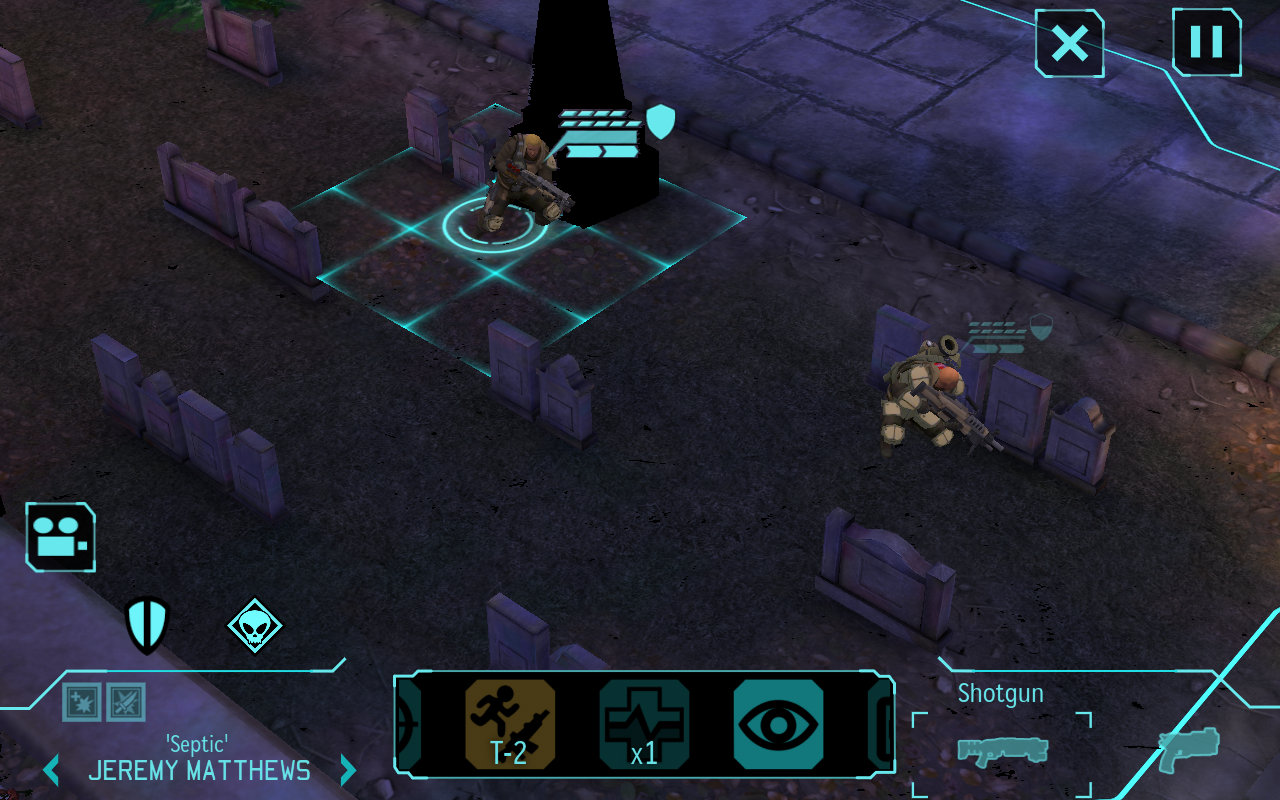
Good cover.
-Research: where you (what else?) research new technologies, perform alien autopsies, and interrogate captured aliens.

-Engineering: this is where you can build satellites, items, weapons, armor, and everything else you will need in the game. You can also expand your base by excavating the rock underneath and building additional facilities there. Once you have a foundry, you can purchase projects that improve upon items, weapons, and more in specialized ways.

-Hangar: all of the interceptors (jet fighters) that XCOM is going to need are stationed here (obviously). You can build new interceptors, equip interceptor weapons built in engineering, and transfer interceptors between continents. North America's continental bonus reduces the build and maintenance cost of all aircraft and aircraft weapons by 50%.

-Situation Room: this is where you monitor the panic levels of various countries, sell acquired items on the gray market (you shouldn't unless they're broken), go on special council missions, launch satellites built in engineering, and fulfill requests for certain items.

-Barracks: where all of your soldiers can be viewed. From here, you promote soldiers, buy squad upgrades from the officer training school, and the like.

-Overall: In the picture on the right, mission control is circled in red, research in yellow, engineering (couldn't get the whole thing, sorry) in blue, and the situation room in green.

Price: 8/10
On android, XCOM goes for $9.99. Some people might gawk at the huge price tag, but remember that this is a full PC/Console game with all of the features included. Also keep in mind that it is a glitch-free game (mostly).

Graphics: 9/10
The graphics for this game are very good for mobile devices, but to fit and run on your phone, this game's visuals had to be downgraded slightly. Not much more to say.

Additional Features
XCOM: Enemy Unknown has no multiplayer at the moment, but it will definitely be added soon. If you played the game on PC, you will know that there are special options called second wave options that often drastically change the way the game plays.

I hope you guys enjoyed this blog, and repost, like, and tell your friends. Good luck, commander.

Look for more XCOM Blogs right here in the future!


Monday, May 19, 2014

How to Take Screenshots on Windows 8

Have you ever wondered how to take a screenshot on your windows 8 computer? If you have, the answer is very simple!

All you have to do is hold down the windows key and the print screen (PrtSc) key. When you do, the screen should dim for a second.

I hoped this helped, and if it did, please tell your friends and reshare. Thanks!

Sunday, May 18, 2014

How to get the Amazon Appstore on Android

Did you have a kindle fire and upgrade your tablet or phone to android, but didn't want to pay for all of those apps again? If the answer is yes, I have just what you need. I will walk you through the whole process (which is quite simple) of installing the amazon appstore on your android device and saving several gift cards worth of money.

Preparations: Go into Settings-Security-Unknown Sources and check it. You will need this to install the appstore itself and any apps in it.

Step 1: Go into your browser and type "install amazon appstore" in the search bar. Select the first result. Click "download".

Step 2: Once the install is finished, go into the app and log in to your regular amazon username/email and password. You can browse around the store if you want, but if you are following this guide tap the button with 3 lines next to the amazon logo in the upper left hand corner. In this menu you will find a button labeled "my apps". When you go into it and select "cloud" at the top, you will find all of the apps that you bought on amazon. 

I hope you found this useful, and if you enjoyed it, please reshare and spread the good news!